
| Touch4Mouse | Version 1.0 | |
| Platforms: Windows (10-11) | License: Name your own price | Size: 150K |
Make mouse-only games work on your touchscreen PC or laptop
If you have a touchscreen, you know that plenty of games are built for a mouse and fail with touch, sometimes in surprising ways. Touch4Mouse fixes these common failure modes:
- The game doesn't see touch input at all.
- The game sees touch input but requires a double tap to produce a single tap.
- Taps and drags land in the wrong place, usually somewhere historical.
- The game needs more than a simple left click. Touch4Mouse adds gestures for right click, hover, and double click, all easily produced from the comfort of your touchscreen.
Touch4Mouse works by faithfully emulating a mouse using your touchscreen. Apps stop knowing a touchscreen is even there and see properly timed mouse events instead. In our testing, about 80% of games with broken touch support work when Touch4Mouse is running. Just launch it, and your touchscreen acts like a mouse for all apps (not just games) until you quit. If that's all you need to know, download it now and enjoy.
Windows 10 and 11 compatible. Tested with three brands of touchscreens, and yours could be next!
Download
Download: Touch4Mouse on itch.ioInstallation: not required; portable, no added drivers or dlls.
But for those who never met a TL they wanted to DR, here's how it works.
Why your taps land in the wrong place
If games keep refusing to respond to your touch, blame Microsoft. When they decided how touch should work for apps that don't explicitly support it, they made some odd choices. The big one is that they don't emulate the timing of a mouse very well.
Think about what a mouse actually does. You move the cursor to a spot, and that takes time. Then you press the button, which takes time. And even for a fast click, there's a significant delay between button down and up (figure a). Windows touch emulation skips all of that. The cursor jumps and the click arrives within a couple of milliseconds of each other (figure b). Dragging has the same problem in reverse, with the final position and the release landing almost together.
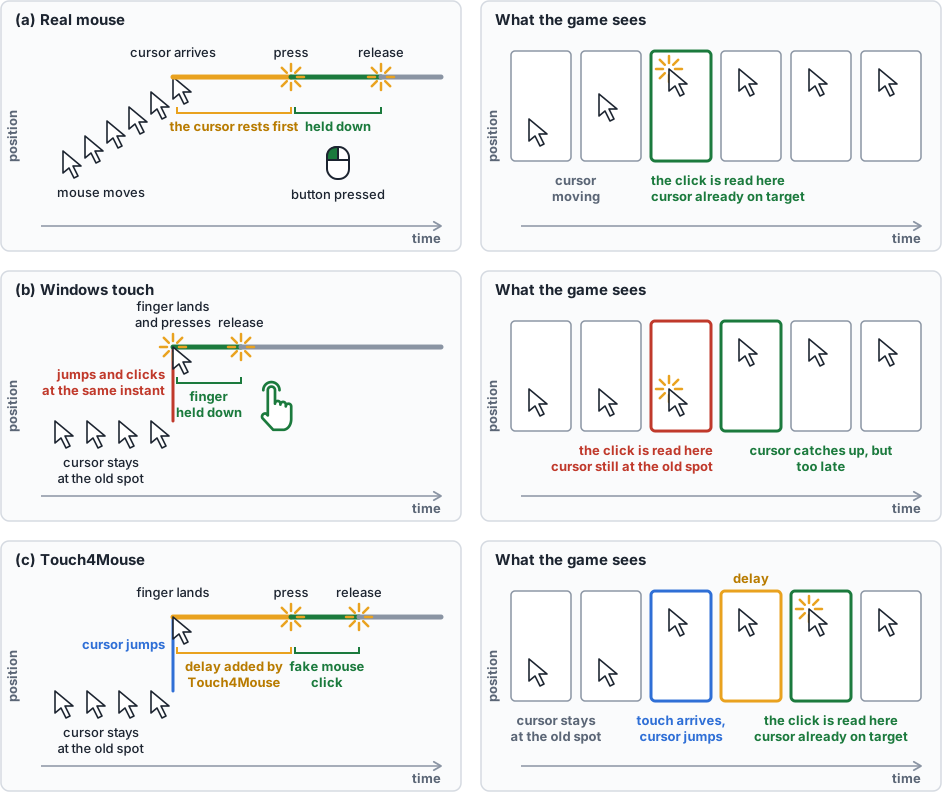
This would be fine if apps responded to the instantaneous location of the cursor when the click lands, but plenty of games don't. Anything that samples the cursor once per frame can end up with a sample that is stale by 30 or even 60 milliseconds. The game sees a click, but at wherever the cursor was before your finger landed (figure b, right). And if the down and up happen too fast, the entire click can be lost.
Touch4Mouse takes over the conversion from touch to mouse and puts the delays back in (figure c): the cursor moves first, the click follows after a short delay, and the game reads it in the right place. Yes, that adds a little lag. You won't notice it, and in exchange the game sees the cursor where you actually tapped. The delay is adjustable, because well-written games and faster frame rates need less injected delay.
Games that never see the touch
The second problem isn't Microsoft's fault. It belongs to the game engine, and it's almost always Unity. If an engine reports both a touch and a mouse event for the same tap, the game sees two events close together in time and place and gets confused. So Unity picks one: it blocks the touch input and listens only to the mouse. It would be fine if it instead used touch whenever a touchscreen is present, and dropped the fake mouse input. Older Unity games did exactly that. The new input system doesn't. It listens only for real mouse events and leaves the developer to wire touch up to do the same things.
Most indie developers can't afford to test on anything beyond their own hardware, so they never find out. Games that would work perfectly well if a touch simply acted like a click end up not seeing the touch at all.
We fix that too, by turning every touch into a fake mouse event. With the touch gone, there's nothing left to block, and every app already supports the mouse.
These two fixes together handle a very large share of the games that otherwise wouldn't work, but there's one other gap that remains.
Right click, double click and hover
Many games expect more than the left button. A right click by long press is possible on Windows, but the system then has to guess after the fact whether your tap was a left or a right click. That costs delay, and sometimes it sends both, or neither.
We skip the guessing. Every tap is a left click. If you want something else, you use a hot zone modifier: a rectangle you place on screen, somewhere clear of the game's own buttons. Hold one finger on the zone, then tap with another, and the tap becomes a right click, a double click, or a hover (move the cursor but send no click).
Hover needs its own zone because touching normally means clicking. With a mouse you can rest the cursor on something without clicking. With a finger you can't, so the hover zone adds that missing ability.
Likewise, double clicking, while theoretically possible, can be hard to deliver via touch with sufficiently tight timing and positioning. But a hot zone can turn a single tap into a double click 100% of the time.
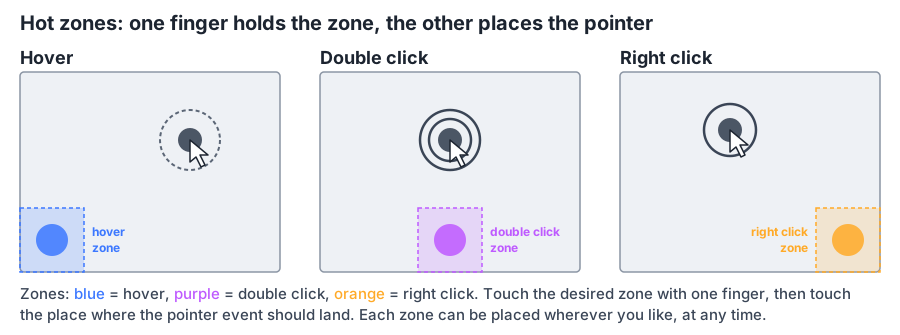
With those in place, almost every game that treats the mouse in the old-fashioned way can be played by touch. And if you don't need those hot zone modifiers, don't place them on the screen.
What we can't fix
One case is out of reach, and it's fundamental: games that move the cursor back to the screen's center on every frame. First-person shooters are the obvious example, though they'd be poor touch games anyway. Some other games do it just to draw a custom cursor. Running those in windowed mode rather than full screen sometimes helps.
 hcidesign.com